www.logitech.com/support

Extrait du fichier (au format texte) :

DIE LINE
COLOR
(NO PRINT)

PMS 185 C

BRAND / LAUNCH: Logitech 2007

DETAILS: AMR / QSG / FRONT

COLOR SPECIFICATIONS

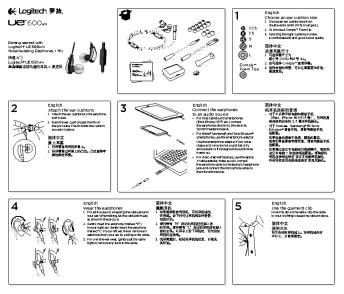
PROJECT TITLE: Pure-Fi Anywhere

SPOT COLORS

PROCESS COLORS

K

5

25

50

75

95

DIE LINES
SPECIFICATIONS / NOTES: Two color print job: Ink Order PMS 185 C + Process Black
Updated with name change.
MODIFICATION DATE: June 08, 2007

THIS PRINT SIZE / SCALE: 100% of original
Designer: SL/MLW
Location: Vancouver, WA

PROJECT TITLE: Pure-Fi Anywhere

SPOT COLORS

DIE LINE
COLOR
(NO PRINT)

PMS 185 C

DETAILS: AMR / QSG / BACK

Les promotions


Touch Mouse Instructions Version 4, 15-Nov-09 ... - Logitech
05/12/2014 - www.logitech.com
Touch Mouse Instructions Version 4, 15-Nov-09 QUICK INSTRUCTIONS 1. Install the Touch Mouse app on your iPhone or iPod touch 2. Install the Touch Mouse Server software on your Mac or PC 3. Start the Touch Mouse Server on your Mac or PC Mac  Find the file iTouch-Server.app and double-click it. The server icon will appear in the Menu Bar. PC  Go to the Windows Start Menu and select Logitech Touch Mouse Server. The server icon will appear in the system tray. 4. Run the Touch Mouse app on your iPhone...

Getting started with Première utilisation Logitech® Wireless Mouse ...
16/02/2012 - www.logitech.com
Getting started with Première utilisation Logitech® Wireless Mouse M325 1 2 On On Getting started with Première utilisation Logitech® Wireless Mouse M325 3 English Plug the Unifying receiver into a computer USB port. Your mouse is now ready for use. Mac®OSXUsers: When plugging in the Unifying receiver, the Keyboard Assistant window may appear. Please close this window. 2 1 English Features 1. Scroll wheel 2.Middle button. The function of this button depends on your operating system and...

Brio 305 Datasheet
Brio 305 Datasheet
20/09/2024 - www.logitech.com
DATASHEET BRIO 305 Meet the essential webcam for better video meetings. Brio 305 is a 1080p webcam with auto light correction and a noise-reducing mic for natural video and audio, plus an integrated privacy shutter. Certified for leading meeting platforms and priced for mass deployment. Give employees a simple-to-use webcam for better video collaboration. Brio 305 is a 1080p webcam certified for Microsoft Teams, Zoom and Google Meet for a reliable meeting experience. Full high definition video,...

Headset Portfolio
Headset Portfolio
25/09/2024 - www.logitech.com
Logitech business headsets - wired Hybrid work requires solutions designed for all types of users and work environments. Regardless of your style or connectivity preference, Logitech business headset portfolio has a device that works the way you do. Logitech headsets and earbuds are designed to work seamlessly with leading video conferencing platforms, giving you an enhanced video collaboration experience. H570e Product Name Connectivity Teams version H650e UC version 1 (USB-A or USB-C) Range 1 (USB-A) 6.2...

Outback X QSG_1101.ai - Logitech
05/12/2014 - www.logitech.com
1 Getting started with Logitech® Gamepad F310 {€OSN-e‡ On Gamepad F310 features Gamepad F310 Xinput DirectInput F310 b b F310 Gamepad F310 ÇX ®0²¥ 2 10 USB 8 9 9 7 3 Getting started with Logitech® Gamepad F310 ation form ant in rtant Impo 5 rranty

Logitech Mk270 For Education One Pager
20/09/2024 - www.logitech.com
Logitech MK270 Wireless Combo for Education Wireless freedom for limitless learning THE VALUE OF EASY NAVIGATION AND TYPING Students should be able to focus on their work, not their technology equipment. The simple addition of a mouse gives them the choice in how best to move around learning apps, the web and more with the ease they need. A full-size keyboard gives them a familiar platform and easy access to the controls and number keys they frequently need. The result? Efficiency and control that...

C505e Datasheet
C505e Datasheet
07/10/2025 - www.logitech.com
DATASHEET C505E HD WEBCAM Step up from built-in laptop optics with the Logitech? C505e business webcam that delivers crisp, smooth and colorful widescreen HD 720p video at a budget-friendly price point that makes office life much easier. C505e provides a 60? diagonal field of view, fixed focus and auto light correction that adjusts illumination of most spaces; one omnidirectional mic supports clear conversation up to 3 meters away. The extra-long USB-A cable and universal clip provides a wide...

Headset Portfolio
Headset Portfolio
26/09/2024 - www.logitech.com
Logitech Business-Headsets  kabelgebunden Hybrides Arbeiten erfordert L?sungen f?r alle Arten von Benutzern und Arbeitsumgebungen. Unabh?ngig von Ihrem Stil oder Ihren bevorzugten Verbindungsoptionen bietet das Portfolio der Logitech Business-Headsets genau die richtigen Ger?te f?r Ihre Bed?rfnisse. Logitech Headsets und Earbuds sind so konzipiert, dass sie nahtlos mit f?hrenden Videokonferenzplattformen funktionieren und bessere Videozusammenarbeit erm?glichen. H570e H650e Produktname Konnektivit?t 1 (USB-A...


Télécharger le manuel - Vtech
15/11/2016 - www.vtech-jouets.com
Manuel d utilisation Super Calendrier de l Avent © 2016 VTech Tous droits réservés Imprimé en Chine 91-003255-001 FR INTRODUCTION PLAQUE ZONE MAGIQUE ACCESSOIRES (25 en tout) INTRODUCTION Vous venez d acquérir le Super Calendrier de l Avent Tut Tut Animo® de VTech®. Félicitations ! C est bientôt Noël ! Votre enfant est peut-être impatient de découvrir ce que lui réserve le Père Noël, mais l attente lui sera plus facile grâce à ce Super calendrier de l Avent. Chaque...

SGH-M300
SGH-M300
13/02/2012 - www.samsung.com
SGH-M300 Imaginez une petite merveille Design compact Appareil photo VGA Radio FM MMS Ecriture intuitive T9 SGH-M300 Caractéristiques Caractéristiques principales Poids Dimensions Tri-bande Batterie Autonomie en communication Autonomie en veille Mains-libres Vibreur Couleur disponible Caractéristiques techniques GPRS Modem intégré Débit modem max JAVA Navigateur WAP SIM Tool Kit DAS Ecran Ecran principal : Type / Nombre de couleurs Résolution Ecran externe : Type / Nombre de couleurs Résolution...

English - LG Electronics
24/11/2014 - www.lg.com
COOKING LRE3091 Free Standing Electric Range Cooking Performance " " " " " " 5.6 cu.ft. Extra-Large Oven Capacity 1.2 cu.ft. Storage Drawer Capacity PreciseTemp!" Bake System 4 Radiant Cooktop Elements Matching Knobs IntuiTouch!" Controls StylE and Design " Premium Finishes in Stainless Steel, Smooth White, and Smooth Black " WideView!" Window " Brilliant Blue Interior " Easy to Clean, Radiant Cooktop Surface Convenience " 2 Full-Width Racks with 7 Positions " GoCook!" Oven...

iPhone 3GS - Kurzübersicht.pdf - Support - Apple
27/11/2014 - manuals.info.apple.com
Willkommen beim iPhone. In dieser Kurzübersicht erfahren Sie, wie Sie Ihr iPhone in Betrieb nehmen und die wichtigsten Funktionen verwenden. Sobald Sie Ihr iPhone zum Telefonieren eingerichtet haben, können Sie auf der folgenden Website weitere Informationen über das iPhone finden: www.apple.com/de/iphone oder www.apple.com/chde/iphone. Auspacken, installieren, los geht s. 1. Laden Sie iTunes. Besuchen Sie www.itunes.com/de/download und laden Sie die neuste iTunes-Version auf Ihren Mac oder...

Serveurs Rack/Tour
Serveurs Rack/Tour
07/02/2012 - event.asus.com
ASUS Server System WHQL Intel Processor-based WHQL ID Product Name SC CPU E6 Series RS700-E6/RS4 RS700-E6/RS8 RS400-E6/PI2 RS500-E6/PS4 RS520-E6/RS8 TS500-E6/PS4 TS700-E6/RS8 E5 Series RS-160-E5 RS-160-S5 RS120-E5/PA4(PA2) RS120-E5/S RS100-E5 RS100-E5 (/PI2 ) RS100-X5 TS700-E5 TS500-E5(/PA4/RX8) TS300-E5(/PA4/PX4) TS300-E5/PX4 TS100-E5/PI4 TW500-E5/RA4 E4 Series RS260-E4/RX8 RS260-E4 RS162-E4/RX4 RS160-E4/PA4 RS120-E4/PA4 RS120-E4/PA2 RS100-E4/PI2 TS700-E4 TS700-E4/(RX8) TS500-E4 (/PA4/PX4) TS300-E4/PX4...

AC4C1 Owner's Manual - Vox
22/07/2016 - www.voxamps.com
AC4C1 GUITAR AMPLIFIER Owner s Manual Manuel d utilisation Bedienungsanleitung Manual de Usuario E F G S 2 IMPORTANT SAFETY INSTRUCTIONS " " " " " " " " " " " " " " " " " " " " " Read these instructions. Keep these instructions. Heed all warnings. Follow all instructions. Do not use this apparatus near water. Mains powered apparatus shall not be exposed to dripping or splashing and that no objects filled with liquids, such as vases, shall be placed on the