Download - Samsung

Extrait du fichier (au format texte) :

Dear Samsung Electronics Stakeholder:
In 2012, the company achieved steady growth thanks to your continued trust and dedication. Despite intensifying competition, we recorded historic sales revenue and operating profit that strengthened our leadership in the global electronics industry. Based on consolidated financial statements, we realized sales revenue of KRW 201 trillion, operating profit of
KRW 29 trillion and net income of KRW 24 trillion, double the previous year. We also maintained a robust financial structure,
with a 49.1 percent liability ratio and 79.5 percent capital adequacy ratio.
Vice Chairman & CEO Oh-Hyun Kwon

The trust and dedication of our customers,
shareholders and society drives change and innovation at
Samsung Electronics

President & CEO Boo-Keun Yoon

President & CEO Jong-Kyun Shin

02

Expanding the market leadership of core businesses
Last year, Samsung Electronics expanded its market leadership in core businesses, including smartphones and TVs. We achieved remarkable results in our mobile business, ranking No. 1 in both sales and market share in smartphones and all mobile phones. In the TV business, we again achieved No. 1 market share, for the seventh year in a row, also earning the highest profitability in the industry. We further strengthened the market power of our
Memory business, outpacing competitors with our unmatched technology, dominant cost savings and advanced process technology development. In our developing businesses, OLED
greatly improved its profitability, led by differentiated competitiveness. The System LSI business also showed outstanding growth in the mobile device market, led by the AP
and CIS sensor segments.
In 2013, we will sharpen our market leadership across core areas and accelerate developing businesses to maintain our strong performance. With our newly reorganized structure of three divisions, we will aggressively respond to rapidly changing business environments as we steer new technology initiatives,
pioneer new markets and identify business opportunities.
Securing our core competitiveness and brand momentum
To reinforce competitiveness, Samsung Electronics is focusing on attracting outstanding talent. We are consistently recruiting


Les promotions


SAMSUNG UHD TV MEDIA LAUNCH EVENT DOUBLE ...
21/11/2014 - www.samsung.com
SAMSUNG UHD TV MEDIA LAUNCH EVENT DOUBLE PASS TICKETS COMPETITION TERMS AND CONDITIONS 1. Instructions on how to participate in the Samsung UHD TV Media Launch Event Double Pass Tickets Competition" ( Competition ) and the Prize (defined below) forms part of these Terms and Conditions. Participation in this Competition is deemed acceptance of these Terms and Conditions. This Competition is not valid in conjunction with any other offer. 2. The Competition commences at 9:00 am (AEDT) on Saturday,...

Terms and Conditions Samsung UHD Monitor Bonus Game ...
21/11/2014 - www.samsung.com
Terms and Conditions Samsung UHD Monitor Bonus Game Promotion (the Promotion ) 8 September 2014 to 30 November 2014 Samsung s UHD Monitor bonus PC game promotion offers End Users the opportunity to claim a free PC game for every UD590 UHD Monitor purchased from an eligible retailer during the Promotion Period. To check eligibility and how to claim please read the terms and conditions below. Promoter: Samsung Electronics Nordics AB, Torshamnsgatan 27, Box 1235, SE - 164 28 Kista, Sverige, (the...

SAMSUNGS HOME THEATER SYSTEM HT-X715
13/02/2012 - www.samsung.com
Pour un bureau Lifestyle: les nouvelles gammes de moniteurs LED Samsung Les nouveaux moniteurs LED de Samsung produisent une image parfaite, consomment peu et attirent tous les regards Zurich, le 27 septembre 2010  Samsung propose une nouvelle gamme de moniteurs LED adaptés à tous les bureaux, petits ou grands. Séduisants par leur design et par la qualité d image, ils brillent également par leur faible consommation d énergie, réduite de 40 pour cent grâce au rétro-éclairage LED. La...

??? ?? pdfDownload - Samsung
21/11/2014 - www.samsung.com
Ò,ǐǐ ȼô ÈüÂÝ ¼0²ù À¼Á1Èǐ ÈüÂÝÇ@ Õ­mɝ­Œ¬p·˜ÁŒÅÐÁ ¬p·˜´)²È²ä. ¼ôѵÈü²” ÏT´Ü 005930  À¼Á1Èǐ²” 2006±DÅÐ Èü²ù ¼ôѵÈü 5,500ÆÐ, ưÁ Èü 5,550ÆÐÇX ¼0²ù®ÇD ưÁ Èü²” ÏT´Ü 005935  Ç…²È²ä. 2006±D 12ÆÔ 31Ç| ®0ÉÇ

Accessoires - Samsung
13/02/2012 - www.samsung.com
NX10 Accessoires Vous augmenterez les avantages et la commodité pour vous en utilisant les accessoires suivants. OBJECTIFS ET ADAPTATEUR POUR FIXATION K Code de modèle : EX-S30NB Code de modèle : EX-T50200SB Code de modèle : EX-S1855SB Code de modèle : ED-MA9NXK Objectif plat 30 mm / F2.0 CUP : 044701012764 Objectif à SOI de 50 à 200 mm / F4.0-5.6 CUP : 044701012771 Objectif à SOI de 18 à 55 mm / F3.5-5.6 CUP : 044701012757 Adaptateur de fixation pour fixation Pentax K CUP : À...

R610 XE5V 7451
R610 XE5V 7451
13/02/2012 - www.samsung.com
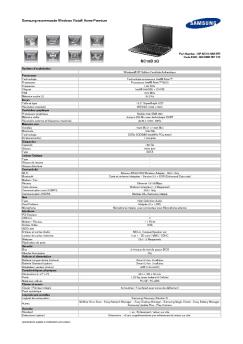
Samsung recommande Windows Vista® Home Premium PC Portable Multimédia 16 pouces Part Number : NP-R610-AS07FR Code EAN : 880 8993 218 400 R610 XE5V 7451 Système d'exploitation Windows Vista® Edition Familiale Premium Authentique Processeur Technologie Processeur Fréquence Chipset FSB Mémoire cache L2 Ecran Taille et type Résolution standard Contrôleur graphique Processeur graphique Mémoire vidéo Résolution externe et fréquence maximale Mémoire vive Installée Maximale Technologie Emplacement(s)...

OpenTSP Driver Description - Samsung
21/11/2014 - www.samsung.com
OfficeServ OpenTSP Driver Description Ed. 00 9. 2003. COPYRIGHT This manual is proprietary to SAMSUNG Electronics Co., Ltd. and is protected by copyright. No information contained herein may be copied, translated, transcribed or duplicated for any commercial purposes or disclosed to third parties in any form without the prior written consent of SAMSUNG Electronics Co., Ltd. TRADEMARKS Product names mentioned in this document may be trademarks and/or registered trademarks of their respective...

R525 I7P-321 (NP-R525-JS02FR)
13/02/2012 - www.samsung.com
Windows®. La vie sans limites. Samsung recommande Windows 7. R525 E7P-321 R525 E7P-321 NP-R525-JS02FR 880 8993 861 804 Affichage Ecran 14'' HD 16:9 (1366 x 768) SuperBright Gloss LED Le choix de la différence tout simplement * Condition de test : Logiciel BatteryMark 4.0.1, Samsung Battery Mode optimisé, Luminosité minimum, Wi-Fi Off ** Condition de test : Lecture continue d'un film en format DivX stocké sur le disque dur, Samsung Battery Mode normal, Luminosité écran niveau 3, Wi-Fi...


Logitech Alert™700e/750e
05/12/2014 - www.logitech.com
Logitech Alert!" 700e/750e System Requirements & Support Guide System Support Guide Contents System Requirements. . . . . . . . . . . . . . . . . . . . . . . . . . . . 3 System Requirements Product Information . . . . . . . . . . . . . . . . . . . . . . . . . . . . 4 Software installation requires an Internet connection. Contact Us . . . . . . . . . . . . . . . . . . . . . . . . . . . . . . . . . . 4 Remote viewing requires a PC or Intel-based Mac running Flash® Player, which is a free download. FCC...

iPod touch ?? - Support - Apple
27/11/2014 - manuals.info.apple.com
iPod touch ŒÇŠ iPod touch Ou(bKQŠ ŠËRM_€ support.apple.com/zh_TW/manuals/ipodtouch0 W( iPod touch N bS•‹ Safariÿ q6_ŒžÞNN 0N_Sï_ž iBookstore QMŒ»SÖ_—0 [‰Qh‚†Ut ŠËSÕ±0 iPod touch Ou(bKQŠ0 N-v„0 [‰Qh`'0†UtTŒe/cô0 zà{À0 ˜;€ý‘Ïf´—2 W( iPod touch N ÿ RM_€ Š-[š > N‚, > •Üe¼g,j_ > rHk ŒÇŠ > ˜;f´—2 0 –ûl` iPod touch N-v„’ð–â[P–ûl`Sê€ýu1 Apple b Apple cˆk v„g RÙO›aÉUF2ˆLfô cÛÿ N_Ř‚[¶^­^âhÄriR•‹VÞe6b†Ut0Y‚—–ûl`VÞe6TŒfôcÛv„vø•܌NJ ÿ ŠËRM_€...

Funzionamento della macchina
20/03/2015 - docs.whirlpool.eu
Funzionamento della macchina Per ulteriori informazioni (inclusa la ricerca e risoluzione guasti e il servizio di assistenza), consultare i singoli capitoli delle Istruzioni per l uso. Suddividere la biancheria secondo simbolo di cura dei capi: Non asciugare in asciugatrice Suddividere i capi in base a: Spessore del materiale: ogni qualvolta si dispone di un carico eccessivo rispetto a quello che l apparecchio può gestire, separare il carico secondo il peso (per esempio dividere gli asciugamani...

Manuel d'utilisation - Vtech
09/04/2018 - www.vtech-jouets.com
Manuel d utilisation Pâtisserie ~ Fête d anniversaire de Clémentine © 2015 VTech Imprimé en Chine 91-003080-003 FR Chers parents, Chez VTech®, nous sommes conscients que les enfants sont notre avenir. Avec notre gamme Flipsies, VTech® aborde un nouveau thème très en vogue chez les enfants : « rêver de devenir ». VTech® a mis au point la technologie MagicPop pour animer ses figurines. En effet, placées sur un MagicPop, les Flipsies déclenchent des phrases et des sons différents !...

Objet : Rappel nouvelle gamme MFP A4 couleur ... - Triumph-Adler
18/01/2018 - www.triumph-adler.fr
TAF16/0612  09/06/2016            Modèles compatibles : TA Color 300ci, 350ci, 400ci  Objet :  Rappel nouvelle gamme MFP A4  couleur         Présentation / positionnement  Une offre A4 sans compromis technologique, la compacité en plus !   Grâce à leur technologie comparable à celle des systèmes A3, la nouvelle gamme MFP A4 TA Triumph Adler  s inscrit dans l évolution du marché : elle vous permet de faire différence en offrant une gamme A4 inédite tout  en assurant la pérennité de votre potentiel A3.    Comment ?  Des systèmes polyvalents et évolutifs, pour une adaptation à tout environnement de travail.     Un choix de finition inégalé pour une plateforme A4 :   ð·...

COMMENT NAVIGUER SUR INTERNET AVEC VOTRE LECTEUR ...
16/03/2012 - www.archos.com
comment naviguer sur internet avec â votre Lecteur WiFi arcHos Après avoir acheté et installé le plug-in Web Browser [Navigateur Internet] en option sur votre lecteur ARCHOS, vous aurez tout Internet au bout de vos doigts. 1 À partir du menu d'accueil, sélectionnez l'icône Web et appuyez sur `OK'. Votre lecteur ARCHOS cherchera une connexion WiFi. Il choisira le premier réseau disponible auquel il s'est connecté auparavant. Si votre appareil ARCHOS n'a jamais été connecté à un réseau,...