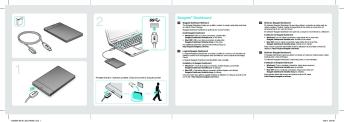
Backup Plus Ultra Slim Quick Start Guide

Extrait du fichier (au format texte) :

3
1

EN WWW.SEAGATE.COM
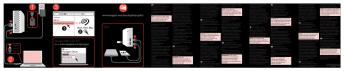
Mac: Download the Paragon driver to use with your Mac: www.seagate.com/
paragon. For Time Machine, the hard drive must be formatted for Mac.
To maximize performance, connect your drive to a USB 3.0 port. Also compatible with USB 2.0.

Libraries
Computer

Seagate Backup Plus Drive

Start_Here_Win

Network

1

2

2

To use with your Mac

®

Go to: www.seagate.com/paragon

Paragon Driver
SUPPORT

USB 3.0
USB 2.0

Downloads
Paragon Driver for Mac OS

Note: To protect your data, always follow the safe removal procedures for your operating system when disconnecting your product.
For customer support, visit www.seagate.com/support/.
To review the details of your drive's warranty, open the Seagate Retail Limited

Les promotions


Desktop Hdd 8tbds1770 9 1603us En Us
29/09/2024 - www.seagate.com
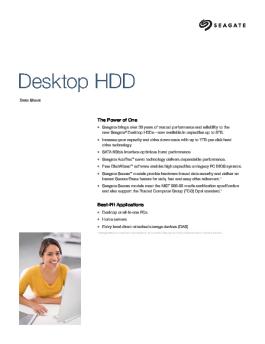
Data Sheet The Power of One Seagate brings over 30 years of trusted performance and reliability to the Seagate? Desktop HDDs now available in capacities up to 8TB Increase your capacity and drive down costs with up to 1.33TB-perdisk hard drive technology SATA 6Gb/s interface optimizes burst performance Seagate AcuTrac!" servo technology delivers dependable performance Free DiscWizard!" software enables high capacities on legacy PC BIOS systems Seagate Secure!" models provide hardware-based data...

Seagate Lyve Mobile Mount Front Loader Quick Start Guide EN US 203651700C
03/11/2025 - www.seagate.com
FCC DECLARATION OF CONFORMANCE This device complies with Part 15 of the FCC Rules. Operation is subject to the following two conditions: (1) this device may not cause harmful interference, and (2) this device must accept any interference received, including interference that may cause undesired operation. CLASS B This equipment has been tested and found to comply with the limits for a Class B digital device, pursuant to Part 15 of the FCC Rules. These limits are designed to provide reasonable protection...

100782401d
100782401d
29/09/2024 - www.seagate.com
Desktop HDD SATA Product Manual ST8000DM002 ST6000DM001 ST5000DM002 ST4000DM000 100782401, Rev. D Gen 17 - May 2016 Document Revision History Revision Date Pages affected and Description of changes Rev. A 07/29/2015 Initial release. Rev. B 09/02/2015 7: Revised Rated Workload statement Rev. C fc, 5-14 & 24: Added 8TB Model and specs 4: Updated Support URL's} 7 & 15: Updated Warranty link text 8: Recording & Interface Technology table updates 11/23/2015 9: Seek time edits 10: DC power...

Momentus 4200 N-Lite
25/02/2012 - www.seagate.com
Momentus 4200 N-Lite ST940110A Momentus 4200 N-Lite ST940110A © 2004 Seagate Technology LLC All rights reserved Publication number: 100354613, Rev. A October 2004 Seagate and Seagate Technology are registered trademarks of Seagate Technology LLC. SeaBOARD, SeaFONE, SeaTDD, SeaTools, and the Wave logo are either registered trademarks or trademarks of Seagate Technology LLC. Other product names are registered trademarks or trademarks of their owners. Seagate reserves the right to change, without...

SeaToolsDOSguide.FR.txt README.TXT R?vision : 31-Dec ... - Seagate
23/08/2019 - www.seagate.com
SeaToolsDOSguide.FR.txt README.TXT Revision : 31-Dec-2010 **IMPORTANT** Ce fichier est associe a un CD-ROM special, auto-executable sous DOS. SeaTools est concu pour s-executer uniquement dans un environnement DOS ; il ne s-agit pas d-une application Windows. SeaTools ne peut pas etre execute sous Windows dans une fenetre DOS. Veuillez vous reporter a la section ? Utilisation de SeaTools ? pour plus d-informations sur le demarrage a partir de ce CD. Seagate Technology LLC SeaTools pour DOS v2.23 Copyright...

100286645e
100286645e
29/09/2024 - www.seagate.com
Users Barracuda 7200.7 Plus ST3160023A ST3120026A ST380013A Barracuda 7200.7 ST3160021A ST3120022A ST380011A ST360014A ST340014A Users Barracuda 7200.7 Plus ST3160023A ST3120026A ST380013A Barracuda 7200.7 ST3160021A ST3120022A ST380011A ST360014A ST340014A ?2003, Seagate Technology LLC All rights reserved Publication number: 100286645, Rev. E December 2003 Seagate, Seagate Technology, and the Seagate logo are registered trademarks of Seagate Technology LLC. SeaTools, SeaFONE, SeaBOARD,...

Guide de sélection des disques durs - Seagate
14/04/2017 - www.seagate.com
Bulletin d'information Guide de sélection des disques durs Comparaison de disques durs Seagate® 7 200 tr/min Le choix du disque dur 7 200 tr/min approprié doit se fonder sur l utilisation de l application, les exigences technologiques et les caractéristiques de chaque disque. Les informations présentées ici vont de pair avec le comparatif des caractéristiques techniques des disques 7 200 tr/min (MB578). Ces informations sont établies afin de permettre à vos clients de choisir le...

Momentus® XT - Seagate
14/04/2017 - www.seagate.com
Fiche technique Momentus XT ® Les performances FAST Factor!" Principaux avantages " Démarrage et fonctionnement équivalents à ceux d un disque SSD1 " Jusqu à 3 fois plus rapide qu un disque dur traditionnel1 " SATA 6 Gbits/s avec technologie NCQ pour une interface rapide " Tout-en-un pour une installation facile et une grande simplicité d utilisation " Fonctionne avec tous les ordinateurs portables ou de bureau, tous les systèmes d exploitation et toutes les applications ...


iPod nano (2nd Gen) Dock (Manual) - Support - Apple
27/11/2014 - manuals.info.apple.com
iPod nano Dock Using the iPod nano Dock Congratulations on purchasing your iPod nano Dock  it holds iPod nano upright as it charges, loads music and photos, and plays music. Use the cable included with your iPod nano to connect the Dock to your computer or to an optional iPod Power Adapter. Then put iPod nano in the Dock. Important: This Dock is compatible only with iPod nano (Second Generation). 2 English iPod nano Dock at a Glance iPod connector Line out port Dock connector port Dock...

Tout l'univers Philips pour vos cadeaux d'a aires
12/03/2018 - www.philips.fr
Tout l'univers Philips pour vos cadeaux d'affaires Notre équipe spécialisée dans les programmes de fidélité et d'avantage répondra de manière efficace et réactive à vos demandes et à vos attentes pour que vous puissiez : * Remercier les clients fidèles * Récompenser les employés * Motiver votre réseau de distribution * Augmenter la participation des consommateurs aux campagnes marketing * Faire décoller les ventes par le biais de prix promotionnels attractifs * Exprimer votre reconnaissance à...

Getting started with Première utilisation Logitech® Touch Lapdesk ...
16/02/2012 - www.logitech.com
Getting started with Première utilisation Logitech® Touch Lapdesk N600 1 2 Getting started with Première utilisation Logitech® Touch Lapdesk N600 3 English Touchpad gestures Point, scroll, swipe 1. Point and slide one finger anywhere on the touchpad to move the on-screen pointer. 2. Scroll with two fingers, up or down. 3. Swipe left with three fingers to go back (page or picture); swipe right to go forward. Left and right click 4. Press for left button mouse click.* 5. Press for right button...

tooldial Reference Guide.book - Logitech
05/12/2014 - www.logitech.com
NuLOOQ tooldialTM Reference Manual Copyright Copyright © 2006 Logitech. All rights reserved. Logitech, the Logitech logo, and other Logitech marks are owned by Logitech and it affiliates and may be registered. All other trademarks are the property of their respective owners. Logitech assumes no responsibility for any errors that may appear in this manual. Information contained herein is subject to change without notice. Table of Contents Chapter 1 Introduction About the NuLOOQ tooldial ........................................................................

Declaration of Conformity - Logitech
05/12/2014 - www.logitech.com
Declaration of Conformity According to EN 45014 and Article 10 of Council Directive 89/336/EEC We, authorized representative, Logitech Ireland Services Limited, Ballincollig Cork, Ireland, declare under our sole responsibility that the following product(s): Logitech : Keyboard Model : Y-US76A Has (have) been tested and found in conformity with the following harmonized European standards: Emission Standard EN 55022:1998 Information technology equipment - Radio disturbance characteristics - Limits...

20070418 - CP ARCHOS et le Groupe TF1
16/03/2012 - www.archos.com
G R O U P E T F 1 Paris, le 18 avril 2007, ACCORD DE PARTENARIAT SUR LA VOD ENTRE ARCHOS ET LE GROUPE TF1 ARCHOS, leader sur le marché des baladeurs multimédia, et TF1 Vision, le service de Vidéo à la Demande du Groupe TF1, annoncent la signature d'un accord de partenariat pour offrir de nouveaux services de Vidéo à la Demande aux utilisateurs des baladeurs multimédia WiFi ARCHOS. Le contenu de cette offre sera dévoilé lors du lancement de la nouvelle gamme de produits au mois...