Q4 Report

Extrait du fichier (au format texte) :

May 7, 2024

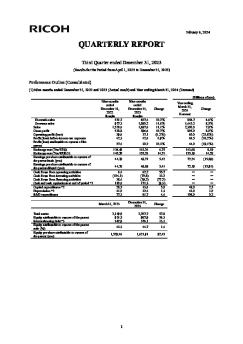
FLASH REPORT
Year ended March 31, 2024
(Results for the Period from April 1, 2023 to March 31, 2024)
Performance Outline (Consolidated)
(1) Year ended March 31, 2023 and 2024 (Actual result) and Year ending March 31, 2025 (Forecast)
Year ended
March 31, 2023
Results

Year ended
March 31, 2024
Results

Change

(Billions of yen)
Year ending
March 31, 2025
Forecast

Change

Domestic sales
Overseas sales
Sales
Gross profit
Operating profit (loss)
Profit (loss) before income tax expenses
Profit (loss) attributable to owners of the parent
Exchange rate (Yen/US$)
Exchange rate (Yen/EURO)
Earnings per share attributable to owners of the parent-basic (yen)
Earnings per share attributable to owners of the parent-diluted (yen)
Profit (loss) on equity attributable to owners of the parent (%)
Profit (loss) before income tax expenses on total assets (%)
Return on invested capital (%) (*1)
Operating profit (loss) on sales (%)

803.9
1,330.2
2,134.1
745.4
78.7

Les promotions

Promo
14.9 € 12.9 €


197001
197001
11/08/2025 - www.ricoh.com
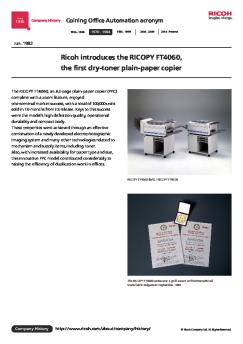
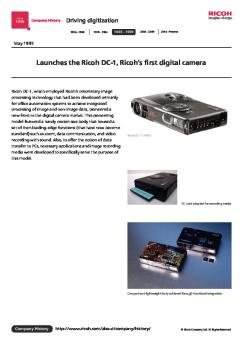
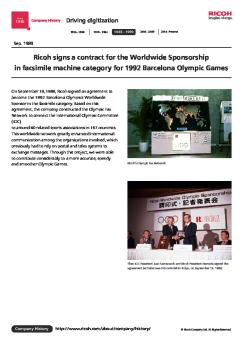
Since 1936 Company History Coining Office Automation acronym 1936 - 1969 1970 - 1984 1985 - 1999 2000 - 2009 2010 - Present Jan. 1970 Ricoh of America, Inc. was established in New Jersey The global success of its hit products provided Ricoh with a stream of opportunities to form technological tie-ups with leading manufacturers in various regions. To facilitate these activities, we set up local affiliates in Taiwan, Korea, the USA and the Netherlands, raising the recognition of the Ricoh...

Operating Instructions - Ricoh
04/09/2018 - www.ricoh.com
Manuel d'installation Lisez attentivement ce manuel avant d'utiliser ce produit et conservez-le à portée de main pour référence ultérieure. Pour une utilisation correcte et sûre, veuillez lire les « Informations de sécurité » avant d'utiliser la Remote Communication Gate A (RC Gate). Un administrateur fait référence à un administrateur RC Gate, sauf mention contraire dans le présent manuel. Symboles utilisés dans ce manuel Structure du système La série de symboles suivante est...

200508
200508
11/08/2025 - www.ricoh.com
Since 1936 Company History Going global 1936 - 1969 1970 - 1984 1985 - 1999 2000 - 2009 2010 - Present Aug. 2005 Establishes the Ricoh Technology Center, a development base for MFPs/printers, in Ebina, Kanagawa Prefecture Ricoh Technology Center was established to consolidate development functions for imaging and solutions products (MFPs, printers, etc.) that were formerly located in separate sites in Japan, including the Ohmori Plant (Tokyo) and Atsugi Plant (Kanagawa Prefecture), into...

Q4 Report Revised
Q4 Report Revised
25/06/2024 - www.ricoh.com
May 14, 2024 Company name: Ricoh Company, Ltd. President and CEO: Akira Oyama Stock code: 7752 (Prime of Tokyo Stock Exchange) Contact: Takashi Kawaguchi, Executive Corporate Officer and CFO Tel. +81-50-3814-2805 (Correction / Correction of Numerical Data) Notice regarding partial correction to Flash Report of Consolidated Financial Results for the Year Ended March 31, 2024 [Prepared on the basis of International Financial Reporting Standards] We inform that Ricoh has revised a part of the Flash...

201310
201310
11/08/2025 - www.ricoh.com
Since 1936 Company History Creating New Value 1936 - 1969 1970 - 1984 1985 - 1999 2000 - 2009 2010 - Present Oct. 2013 Launches RICOH THETA, the world's first imaging device that captures fully spherical views RICOH THETA can capture an all-round view surrounding the photographer with a single shutter release and produce the result as a fully spherical image. This invention, the world's first of its kind*, was achieved by employing a micro twin-lens reflex optical system developed by Ricoh...

201102
201102
11/08/2025 - www.ricoh.com
Since 1936 Company History Creating New Value 1936 - 1969 1970 - 1984 1985 - 1999 2000 - 2009 2010 - Present Feb. 2011 Launches the visual communication business Ricoh entered the visual communication sector by offering systems for conveying various forms of information, including images and sounds, efficiently through a single tool. We have introduced a stream of innovative products to advance business communications. Among the major examples are: the Unified Communication System (USC), a...

Manuel utilisateur - Ricoh
07/12/2016 - www.ricoh.com
Manuel utilisateur 1 À propos de la RC Gate 2 Enregistrement de la RC Gate 3 Configuration de la fonction Détection auto 4 Enregistrement de périphériques auprès du Serveur de communication 5 Configuration des détails des informations enregistrées 6 Annexe Lisez attentivement ce manuel avant d utiliser cet appareil, et conservez-le à portée de la main afin de pouvoir vous y référer par la suite. Pour garantir une utilisation sûre et correcte, veillez à lire les consignes...

Esg Databook 2022
Esg Databook 2022
27/03/2026 - www.ricoh.com
RICOH Group ESG Data Book 2022 0?0?0?0?0?0?0? ESG0?0?0n0?0?0? 2022 CONTENTS Basic Data W?g,`?X1 Governance 0?0?0?0?0? Company Data Oy>W?g,`?X1 01 Financial Data ??R?0?0?0n 02 Concept of Sustainability 0?0?0?0?0?0?0?0?0n?0He? 03 Materiality and ESG Targets for the Ricoh Group 0?0?0?0?0?0?0?0n0?0?0?0?0?0?0? ????y>O???L? 0hESG v?j 04 Corporate Governance 0?0?0?0?0?0?0?0?0?0?0?0? 07 Risk Management


Guide de l'utilisateur
16/02/2012 - www.logitech.com
Logitech ® Guide de l'utilisateur Table des Matières A propos du TransporterTM....................................................................................... 2 Avant de commencer............................................................................................. 3 Configuration requise ........................................................................................ 3 Installation du logiciel SlimServer ..............................................................................

Operating instructions - Hotpoint.eu
21/12/2017 - www.hotpoint.fr
Operating instructions DISHWASHER EN FR PL Contents EN Product Fiche, 2 English, 1 Français, 15 Polski, 29 Precautions, advice and Assistance, 3-4 General safety Disposal Saving energy and respecting the environment Assistance Installation, 5-6 Positioning and levelling Connecting the water and electricity supplies Advice regarding the first wash cycle Technical data Description of the appliance, 7 LTB 4M116 Overall view Control panel Loading the racks, 8-9 Lower rack Cutlery basket Upper...

caractéristiques techniques - Dyson
14/05/2018 - www.dyson.fr
CARACTÉRISTIQUES TECHNIQUES SCHÉMA DU DOS DE L APPAREIL SCHÉMA DE CÔTÉ Équerre de fixation (2 points de fixation) Point d entrée du câble Autre point d entrée du câble Points de fixation (4) Se reporter au tableau pour les hauteurs d installation recommandées Dimensions en mm (+/- 5 mm) SOL Hauteurs d installation recommandées (distance au sol) Dégagement minimum Hommes X 1050 mm Y 990 mm Z 390 mm 200 mm du sol ; un espace de 50 mm de chaque côté et au-dessus de...

Es ES 7178543400 MDM ENERGY LABEL EU 2021 Es ES
24/10/2025 - www.grundig.com
GRUNDIG GD7P510442WB 7178543400 306 68 6,0 10,0 53 47 9:30 3:58 76

Conseils généraux de sécurité - H.Koenig
12/07/2017 - www.hkoenig.com
Manuel d'utilisation Bedienungsanleitung - Handboek Manual de Utilización - Manuale d uso ROBOT DE CUISINE MULTI-FONCTIONS MULTIFUNKTIONS-KÜCHENMASCHINE MULTIFUNCTIONEEL KEUKEN ROBOT ROBOT DE COCINA MULTIFUNCIÓN ROBOT DA CUCINA MULTIUSO Génie 5 Utilisation maximale par opération : 1 minute Maximale Nutzung pro Transaktion: 1 Minute Maximum gebruik per : 1 minute Uso máximo por operación: 1 minuto Utilizzo massimale per operazione: 1 minut0 FRANCAIS Cher utilisateur, avant la première...

iPod mini (2nd Gen) User's Guide (Manual) - Support - Apple
27/11/2014 - manuals.info.apple.com
iPod mini User s Guide Contents 3 Quick Start 5 8 What You Need to Get Started Four Steps to Playing Music on iPod mini 12 12 18 22 32 36 42 45 Using iPod mini Using iPod mini Controls Connecting and Disconnecting iPod mini Organizing and Transferring Your Music Adjusting iPod mini Settings Using the Extra Features of Your iPod mini Charging the iPod mini Battery iPod mini Accessories 49 Tips and Troubleshooting 56 Learning More, Service, and Support 58 Safety and Cleaning 2 1 Quick...