Corporate Data - Ricoh

Extrait du fichier (au format texte) :

CORPORATE DATA

Ricoh Company, Ltd.
Corporate Headquarters

15-5, Minami-Aoyama 1-chome,
Minato-ku, Tokyo 107-8544, Japan
Tel: (81) 3-3479-3111
Fax: (81) 3-3403-1578
Date of Establishment

February 6, 1936

Depositary and Agent for American Depositary Receipts

The Bank of New York
101 Barclay Street, 22 West
New York, NY 10286, U.S.A.
Tel: 212-815-2042
US toll free: 1-888-269-2377
Home Page: http://www.bankofny.com/adr
Listing in the Amsterdam Security Account
System on Amsterdam Stock Exchange

Nominee Amsterdam Stock Exchange
Number of Shares Authorized

1,000,000,000 shares
Number of Shares Issued (as of March 31, 1998)

Depositaries and Agents for Global Bearer Certificates

Deutscher Kassenverein Aktiengesellschaft (DKV)
Commerzbank Aktiengesellschaft

691,546,422 shares
Stock Listings

Tokyo, Osaka, Nagoya, Fukuoka,
Sapporo, Hiroshima, Niigata, Kyoto,
Amsterdam, Frankfurt, Paris

Clearing House and Sponsoring Banks for Listing on
Bourse de Paris

Société Interprofessionnelle pour la Compensation des Valeurs Mobilières (SICOVAM)
Crédit Lyonnais
Nomura France


Les promotions

Promo
14.9 € 12.9 €


Operating Instructions - Ricoh
04/09/2018 - www.ricoh.com
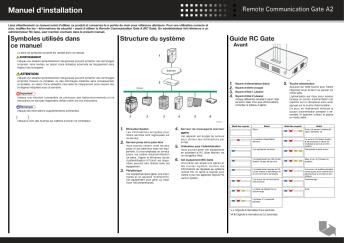
Manuel d'installation Lisez attentivement ce manuel avant d'utiliser ce produit et conservez-le à portée de main pour référence ultérieure. Pour une utilisation correcte et sûre, veuillez lire les « Informations de sécurité » avant d'utiliser la Remote Communication Gate A (RC Gate). Un administrateur fait référence à un administrateur RC Gate, sauf mention contraire dans le présent manuel. Symboles utilisés dans ce manuel Structure du système La série de symboles suivante est...

200508
200508
11/08/2025 - www.ricoh.com
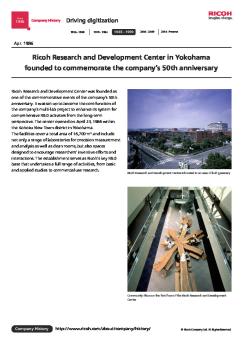
Since 1936 Company History Going global 1936 - 1969 1970 - 1984 1985 - 1999 2000 - 2009 2010 - Present Aug. 2005 Establishes the Ricoh Technology Center, a development base for MFPs/printers, in Ebina, Kanagawa Prefecture Ricoh Technology Center was established to consolidate development functions for imaging and solutions products (MFPs, printers, etc.) that were formerly located in separate sites in Japan, including the Ohmori Plant (Tokyo) and Atsugi Plant (Kanagawa Prefecture), into...

2014092
2014092
11/08/2025 - www.ricoh.com
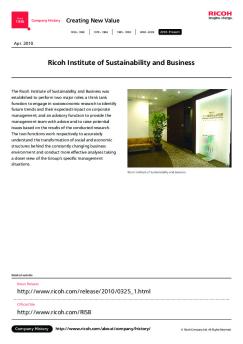
Since 1936 Company History Creating New Value 1936 - 1969 1970 - 1984 1985 - 1999 2000 - 2009 2010 - Present Sep. 2014 Launches the additive manufacturing (AM) business Ricoh's additive manufacturing (AM) business, which the Company launched, is centered on 3D printers. The initial project in this business was to open RICOH Rapid Fab, a base for offering manufacturing innovation solutions. It is a frontline base for the 3D printers business, tasked with procurement and marketing, output...

Déclaration annuelle des émissions polluantes - Rejets 2011 - Ricoh
04/09/2018 - www.ricoh.com
Déclaration annuelle des émissions polluantes - Rejets 2011 - Établissement : RICOH INDUSTRIE FRANCE Date : Commune : WETTOLSHEIM Code postal : 68920 -1- Section propriétés Identité de l'exploitant(A) Nom de l'exploitant Forme juridique Numéro SIREN Adresse du siège social Code postal Ville Pays Société mère RICOH INDUSTRIE FRANCE SAS 341095735 144 route de Rouffach 68920 WETTOLSHEIM France RICOH COMPANY LTD Informations relatives à l'établissement(B) Nom de l'établissement Adresse...

Manuel utilisateur - Ricoh
07/12/2016 - www.ricoh.com
Manuel utilisateur 1 À propos de la RC Gate 2 Enregistrement de la RC Gate 3 Configuration de la fonction Détection auto 4 Enregistrement de périphériques auprès du Serveur de communication 5 Configuration des détails des informations enregistrées 6 Annexe Lisez attentivement ce manuel avant d utiliser cet appareil, et conservez-le à portée de la main afin de pouvoir vous y référer par la suite. Pour garantir une utilisation sûre et correcte, veillez à lire les consignes...

2016032
2016032
11/08/2025 - www.ricoh.com
Since 1936 Company History Creating New Value 1936 - 1969 1970 - 1984 1985 - 1999 2000 - 2009 2010 - Present Mar. 2016 The Ricoh Group draws on its technological prowess to enter the healthcare field Population aging in advanced nations, particularly in Japan, has created major social issues. These include surging healthcare costs and widening gaps in regional medical standards. The Ricoh Group, drawing on its technological prowess, has entered the healthcare field ? ??0ny^}Lm;R?0ni?[P to...

200810
200810
11/08/2025 - www.ricoh.com
Since 1936 Company History Going global 1936 - 1969 1970 - 1984 1985 - 1999 2000 - 2009 2010 - Present Oct. 2008 Ricoh enters the color Print-On-Demand market and introduces a color production printer, the Ricoh Pro C900 RICOH Pro C900 was launched to pioneer the RICOH Pro series, a new production printer brand. The product was a full-fledged print-on-demand model designed to demonstrate the high-speed, high-productivity capability of achieving 90ppm (A4 landscape) for both color and monochrome...

198312
198312
11/08/2025 - www.ricoh.com
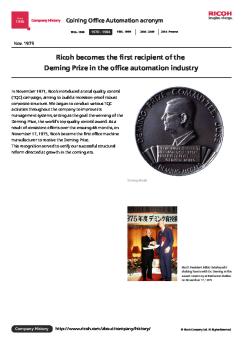
Since 1936 Company History Coining Office Automation acronym 1936 - 1969 1970 - 1984 1985 - 1999 2000 - 2009 2010 - Present Dec. 1983 Ricoh UK Products Ltd. founded In the 1980s, Ricoh proactively pursued global business development. Export sales grew to account for 34.1% of the total for fiscal 1978, and operation bases were set up in new locations around the globe. Major subsidiaries established at that time included Ricoh Electronics Inc., a manufacturing company for office automation...


Nikon CS4000_Fr_139B - Nikon France
18/09/2017 - www.nikon.fr
SUPER COOLSCAN 4000 ED %Ï Véritable résolution optique : 4000 dpi sur 14 bits, sortie sur %Ï Quantification 16/8 bits %Ï Objectif de reproduction SCANNER NIKKOR ED %Ï Numérisation rapide en 38 secondes (avec le transfert d image sur le moniteur) %Ï Nouvelle fonction de traitement des films négatifs couleur %Ï Autofocus et prévisualisation rapides %Ï Interface IEEE1394 ultra-rapide %Ï Adaptateur pour les films en bobine (en option) %Ï Multi-échantillonage %Ï Technologie Digital...

Nytro 3050 Sas Ssd DS2101 2206FR Fr FR
14/08/2024 - www.seagate.com
FICHE TECHNIQUE DES SSD 2,5 POUCES Conçus pour les applications rapides des centres de données Gamme de disques SSD Nytro 3000 SAS Le Seagate® Nytro® 3050 SAS SSD offre une capacité atteignant 15 To dans un format de 2,5 po x 15 mm, une interface 12 Gbits/s dotée de deux ports pour des vitesses allant jusqu'à 2 200 Mo/s, la surveillance du disque, le chiffrement conforme aux exigences des pouvoirs publics, et jusqu'à 10 écritures complètes par jour pour des performances élevées, évolutives...

Flatscreen TV Specs - Panorama Resort
24/11/2014 - www.lg.com
HOSPITALITY DIGISIGN Direct LED Commercial Widescreen Integrated HDTV ðê 55LN541C ðê 47LN541C ðê 42LN541C ðê 32LN541C 55" class (54.6" measured diagonally) 47" class (46.9" measured diagonally) 42" class (41.9" measured diagonally) 32" class (31.5" measured diagonally) Optimized Features for Commercial Use FOR EFFICIENT MANAGEMENT PUBLIC DISPLAY MODE From channel selection to energy-saving features, Public Display Mode allows you to control the TV settings in your business area prevent...

Zone Wired Earbuds
Zone Wired Earbuds
11/05/2025 - www.logitech.com
FICHE TECHNIQUE ZONE WIRED EARBUDS Pr?sentez-vous sous votre meilleur jour gr?ce aux Logitech? Zone Wired Earbuds. La technologie avanc?e et certifi?e du micro anti-parasite capture votre voix avec une clart? incomparable pour am?liorer les r?unions, et le son haute qualit? vous permet de rester concentr?, o? que vos travailliez. Les Zone Wired Earbuds sont compatibles avec la plupart des applications d'appels vid?o sur la majorit? des plateformes et syst?mes d'exploitation. Pourvus d'un design...

Mode d'emploi Gebruiksaanwijzing Users' Manual - Nespresso
22/11/2016 - www.magimix.fr
M 200 Mode d'emploi Gebruiksaanwijzing Users' Manual Ne mettez l'appareil en marche qu'après avoir pris connaissance de ce mode d'emploi! Les consignes de sécurité voir page 8! Het apparaat pas na het lezen van deze gebruiksaanwijzing in gebruik nemen. Veiligheidsvoorschriften zie pagina 8 en 9! Read these instructions before using your appliance. Safety instructions, see page 9! Mise en marche " Inwerkingstelling " Preparation Mettre en marche Aanzetten Switch on chauffe verwarmt heating Remplir...

Micro rigolo
Micro rigolo
03/04/2012 - www.vtech-jouets.com
Manuel d'utilisation 1. ALIMENTATION 1. INSTALLATION DES PILES 1. Avant d'insérer les piles, s'assurer que le jouetestéteint. 2. Ouvrirlecompartimentàpilessituéàl'arrière dumicroàl'aided'untournevis. 3. Insérer3pilesdetypeAAAenrespectantle schémaquisetrouvedanslecompartiment àpiles. 4. Refermer soigneusement le couvercle du compartimentàpilesets'assurerquelavis estbienserrée. - Micro rigolo petite bande de mousse. Celle-ci permet un meilleur maintien des piles. Le compartimentàpilesdevraêtresoigneusementfermépouréviterquedetrès...