GUÍA RÁPIDA

Extrait du fichier (au format texte) :

GUÍA RÁPIDA
Conecte el aparato al suministro de agua y a la red eléctrica (consulte el Manual de instalación).
Antes de utilizar el aparato, lea las instrucciones detenidamente.

6th Sense (Función Sexto Sentido)
Se activa automáticamente para indicar que el aparato está
funcionando para alcanzar las condiciones de conservación óptimas.

Alarma de funcionamiento anómalo
Consulte el apartado "Qué
hacer si...".

Sólo para Europa 00800-40088400 www.whirlpool.eu/myfridge

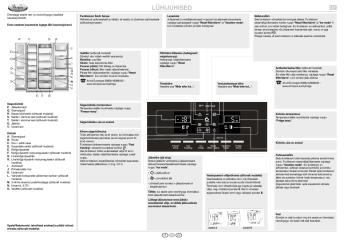
Compartimento frigorífico
A. Luz interior
B. Estantes
C. Estante - tapa del cajón
D. Cajón "snack" (según el modelo)
E. Cajón para fruta y verdura
F. Dispositivo de regulación de la humedad en el cajón para fruta y verdura (si hubiera)
G. Cajón carne/fruta y verdura
H. Dispositivo de regulación de la temperatura en el cajón para carne/fruta y verdura (si hubiera)
I. Placa de características
J. Compartimento para productos lácteos
K. Anaqueles contrapuerta
L. Compartimento fresco y Nature Fresh (si hubiera)
M. Anaquel 2 litros con portabotellas (según el modelo)
N. Anaquel 0,75 litros
O. Filtro agua (según el modelo)

Child Lock (Seguridad para niños)
Para bloquear/desbloquear los botones del panel de mandos y el distribuidor de agua/hielo, pulse al mismo tiempo los botones "Reset filter/alarm" y "Vacation mode" hasta visualizar el símbolo y oír una señal acústica.

Modo Eco
Permite ahorrar energía. Para activar/desactivar la función, pulse al mismo tiempo los botones "Reset filter/alarm" y "Ice mode" 5
segundos hasta que se oiga una señal acústica. Con la función activa, la pantalla solo se ilumina cuando se interactúa con el aparato o con el panel de mandos; si no, aparece sólo el símbolo
.
Es importante resaltar que esta operación no desconecta el aparato de


Les promotions


Käyttöohjeet
Käyttöohjeet
20/03/2015 - docs.whirlpool.eu
TÄRKEITÄ TURVALLISUUSOHJEITA OMA SEKÄ MUIDEN TURVALLISUUS ON HYVIN TÄRKEÄ SEIKKA Tässä käyttöohjeessa sekä itse laitteessa on tärkeitä turvallisuutta koskevia viestejä. Lue ne aina ja noudata niitä. Tämä on turvallisuutta koskeva vaaran merkki. Se varoittaa mahdollisista käyttäjää tai muita henkilöitä uhkaavista vaaroista. Kaikkien turvallisuutta koskevien varoitusten edellä on vaaran merkki ja jokin seuraavista sanoista: VAARA Osoittaa vaaratilanteen, joka aiheuttaa vakavia...

HOB INSTRUCTIONS DIMENSIONS OF COOKTOP AND ...
20/03/2015 - docs.whirlpool.eu
AKT 108 DE GB FR NL ES PT GR IT SE DK NO FI PL CZ SK HU RU HOB INSTRUCTIONS 1. Radiant cooking zone Ø 210 PROTECTING THE ENVIRONMENT 3. Radiant cooking zone Ø 145 4. 2 To get full satisfaction from the hob, please read these instructions carefully and keep them for future consultation. 2. 3 Radiant cooking zone Ø 145 Radiant cooking zone Ø 180 Disposal of packaging materials " The packing material can all be fully recycled, as confirmed by the recycling symbol . " The various...

??????????? ????? ???????? ???????????? ???????? ...
??????????? ????? ???????? ???????????? ???????? ...
20/03/2015 - docs.whirlpool.eu
 '/ &O ?@0;L=0  4;O 3> ?@0==O V 2V468ABOE, 2 O:8E 70728G09 ?5@CBL 1V;87=C 2 4>3@03@0< B0 >AV1=8: 7 CAB0=>2:8; O:I> 28 ?5@540TB5 FN ?@0;L=C A>1V, ?5@5409B5 W9 B0:>6 =AB@C:FVN 7 5:A?;C0B0FVW, "01;8FN ?@>3@0< B0 >AV1=8: 7 CAB0=>2:8.   '" !#"& ...

EINBAUANLEITUNG KOCHFELD MAßE DER KOCH- UND ...
20/03/2015 - docs.whirlpool.eu
EINBAUANLEITUNG KOCHFELD AKT 100 DE 1. 2. Strahlungskochzone Ø 210 3. Strahlungskochzone Ø 145 4. 3 2 Strahlungskochzone Ø 145 Strahlungskochzone Ø 180 4 1 Betrieb der kochzonen Die einstellknöpfe des kochfeldes befinden sich auf dem bedienfeld des herdes. " Stellen Sie den Bedienknopf auf eine der Positionen 1 bis 6, die unterschiedlichen Temperaturen entsprechen. " Zum Ausschalten der Kochzonen stellen Sie den Einstellknopf auf "0. Wichtig: Zur Vermeidung von dauerhaften Beschädigungen...

501963701101A_PL.qxp:Layout 1
20/03/2015 - docs.whirlpool.eu
KARTA URZDZENIA PL - Wszystkie póBki oraz póBki drzwiowe s wyjmowane. - Temperatury wewntrzne urzdzenia s zale|ne od temperatury otaczajcego powietrza, czstotliwo[ci otwierania drzwi oraz od miejsca, w którym stoi urzdzenie. Podczas ustawiania temperatury nale|y uwzgldni te czynniki. - Akcesoria urzdzenia nie nadaj si do mycia w zmywarce. URUCHOMIENIE URZDZENIA Zamontowa rozpórki (je[li dostarczono w komplecie) na gónej cz[ci skraplacza znajdujcego...

TUOTETIEDOT
TUOTETIEDOT
20/03/2015 - docs.whirlpool.eu
TUOTETIEDOT AKZ 223/01 FI 1. Käyttöpaneeli 2. Jäähdytystuuletin (ei näkyvissä) Tuulettimen toiminta riippuu uunin saavuttamasta lämpötilasta, ja se voi jatkaa toimintaansa muutaman minuutin vielä sen jälkeen kun uuni on kytkeytynyt pois päältä. 3. Ylempi lämmitysvastus (voidaan laskea alas) 4. Takavalo 5. Sivuvalo 6. Pyöreä lämmitysvastus (ei näkyvissä) 7. Tuuletin 8. Katalyyttinen takaseinä 9. Alempi lämmitysvastus (ei näkyvissä) 10. Uunin eristetty luukku Ylin kannatintaso Alin kannatintaso Uunin...

QRG GT286 GB W10507596.indd
20/03/2015 - docs.whirlpool.eu
QUICK REFERENCE GUIDE GB DIGITAL DISPLAY The display includes a 24-hour clock and indicator symbols. JET DEFROST BUTTON Use to select Jet Defrost function and select type of food to be defrosted. THIS AUTOMATIC SAFETY FUNCTION IS ACTIVATED 1 MINUTES AFTER the oven has returned to stand bymode . In this mode the door will be locked. THE DOOR MUST BE OPENED AND CLOSED e.g. putting food into it, before the safety lock is released. Else the display will show DOOR . COOK & REHEAT WITH MICROWAVES USE...

Manual de instrucciones
20/03/2015 - docs.whirlpool.eu
INSTRUCCIONES IMPORTANTES PARA LA SEGURIDAD SU SEGURIDAD Y LA DE LOS DEMÁS ES MUY IMPORTANTE. Este material y el mismo aparato contienen mensajes de seguridad importantes relativos a la seguridad, que deberá leer y respetar en todo momento. Éste es el símbolo de alerta, relativo a la seguridad, sirve para indicar potenciales riesgos para el usuario y para las demás personas. Todos los mensajes relativos a la seguridad irán precedidos por el símbolo de alerta y por los siguientes términos: PELIGRO: indica...


PMO800P-9
PMO800P-9
05/07/2012 - www.smeg.fr
PMO800P-9 colonial Porte coulissante crème satiné, finition dorée pour niche four micro-ondes EAN13: 8017709158859 Esthétique coordonnée aux fours COLONIAL SCP805P-9 / SC805P-9 Dimensions maximales four micro-ondes P 50 x L 55,5 x H 35,5 Versions PMO800A-8 - Anthracite SMEG France 9, rue Linus Carl Pauling B.P. 548 76824 MONT SAINT AIGNAN Cedex Tél.: +33 (0)2 35 12 14 14 Fax : +33 (0)2 35 60 70 77 PMO800P-9 colonial pour micro-ondes SMEG France 9, rue Linus Carl Pauling B.P. 548 76824...

Canon Business Services - Canon France
01/12/2014 - www.canon.fr
Canon Business Services Impression et publication de données stratégiques Notre prestation éditique Notre service de composition et d impression de documents stratégiques vous permet d optimiser l utilisation de vos données variables dans tous vos courriers. Factures, courriers de marketing direct, lettres de gestion : nous pouvons composer puis enrichir vos flux de données variables. Les documents sont ensuite intégrés dans un flux standardisé d édition, avant l impression,...

4AA7 8001ENW
4AA7 8001ENW
12/05/2025 - h20195.www2.hp.com
Make your print solution carbon neutral HP Managed Print Services: Carbon Neutral MPS1 Take action to ensure your printing is certified carbon neutral1 ACHIEVE CERTIFIED CARBON NEUTRAL PRINTING1 GAIN INSIGHT INTO YOUR CARBON EMISSIONS INSPIRE TEAMS AND PARTNERS Align printing with your environmental goals without interrupting your business momentum Measure progress and discover how to reduce network-wide carbon emissions Demonstrate your commitment to environmental goals by engaging our network...

When To Use A Stylus And A Mouse For Optimal Learning
05/04/2025 - www.logitech.com
Adaptar las herramientas tecnol?gicas a los m?todos de aprendizaje Hoy en d?a, disponemos de m?s herramientas tecnol?gicas que nunca. Pero ncu?les son las adecuadas para su escuela? nY en qu? momento? Vamos a descubrir las ventajas de ense?ar y aprender con un l?piz digital y un rat?n Se usa el Aprendizaje activo l?piz digital ?No hace falta quedarse sentado! Con un l?piz digital y una tablet o un Chromebook, los estudiantes y los docentes se levantan y se mueven con total libertad, y podr?n...

Solutions informatiques durables HP Guide d'achat
09/12/2016 - www.hp.com
White paper Solutions informatiques durables HP Guide d achat Table of contents Introduction 2 Attributs du produit 3 PC (ordinateurs de bureau, portables) et moniteurs 3 EPEAT 4 Serveurs 5 Services d'imagerie et d'impression 6 Consommables d'impression 7 Évaluation des cartouches d'impression 8 Attributs génériques 8 Recyclabilité 9 Efficacité de l'emballage 9

OM, K760 Cut-n-Break, 2010-01, FR - Husqvarna
29/07/2016 - www.husqvarna.com
Manuel d utilisation K 760 Cut-n-Break Lire attentivement et bien assimiler le manuel d utilisation avant d utiliser la machine. French EXPLICATION DES SYMBOLES Symboles sur la machine: AVERTISSEMENT! La machine utilisée de manière imprudente ou inadéquate peut devenir un outil dangereux, pouvant causer des blessures graves voire mortelles à l utilisateur et aux autres personnes présentes. Lire attentivement et bien assimiler le manuel d utilisation avant d utiliser la machine. Utiliser...